


HP M310 Dual Mouse
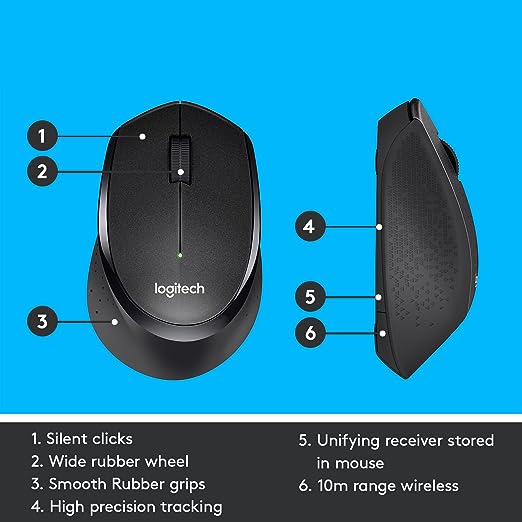
The HP M310 Dual Mode Mouse is a compact wireless mouse that lets you switch seamlessly between Bluetooth and 2.4 GHz USB receiver, making it ideal for users who work across two devices. It offers up to 3200 DPI for precise control, an ambidextrous full‑size design with rubber side grips for comfort, and a multi‑surface sensor that tracks smoothly even on challenging surfaces like marble.
Key features :
| Feature | Details |
|---|---|
| Model | HP M310 Dual Mode Mouse (AB3C8AA) |
| Connectivity modes | Dual mode: Bluetooth 5.3 and 2.4 GHz wireless (USB dongle) |
| DPI | Up to 3200 DPI (adjustable) |
| Sensor | High‑precision optical, multi‑surface sensor |
| Buttons | 6 buttons including scroll and side buttons |
| Design | Full‑size, ambidextrous, with rubber grips for all‑day comfort |
| OS compatibility | Windows 10 and Windows 11 |
| Dimensions / weight | Approx. 11.2 × 6.8 × 3–4 cm; about 65 g |
| Power | AA battery powered (battery usually included in box or required) |
| Range | Standard 2.4 GHz/Bluetooth desktop range (up to ~10 m, line‑of‑sight) |
| Use case | Home and home‑office productivity, multi‑device workflows |
| Colour | Black |
| Warranty | Typically 1–3 years (region dependent) |
| Included in box | Mouse, USB receiver, documentation; some packs include AA battery |
FAQs :
1. What does “dual mode” mean on the HP M310?
Dual mode means the mouse can connect using either Bluetooth or the 2.4 GHz wireless USB receiver, so you can pair it with two devices and switch between them.
2. How do I switch between Bluetooth and the 2.4 GHz receiver?
Use the connection switch on the mouse bottom (or mode button, depending on batch). Set one position for the USB receiver and the other for Bluetooth, then pair once per device.
3. Which operating systems are supported?
The HP M310 Dual Mode Mouse is officially supported on Windows 10 and Windows 11. It may also work on other systems that support standard Bluetooth mice or USB HID, but those are not guaranteed.
4. Does the mouse need drivers or software?
No extra drivers are usually required. It works as a plug‑and‑play HID mouse once you connect via Bluetooth or insert the USB receiver.
5. What is the DPI range of the HP M310?
It supports up to 3200 DPI, providing precise tracking for general productivity and everyday use.
6. Are these products original and authentic?
Yes 100%. We only sell genuine, original HP M310 Dual Mouse sourced directly from authorized brands and distributors. No replicas, no counterfeits, ever.





Reviews
There are no reviews yet.